| |
| | Prev. | Installation and Registration | |
|
 | |  | |
Registration.
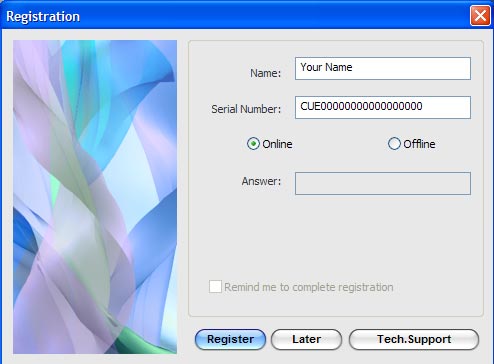
After purchasing you will receive a registration number. You should register Curtains to activate it. There are two ways how to register plug-in: Online and Offline. Online Registration. If you are connected to the Internet then the Online registration is simplest way of registration. After launching Curtains you will see a registration dialogue. Just select the Online radio button. Insert Your name and given serial number and press the Register button. Plug-in will connect to our Registration server to complete your registration. If registration is successful then you will see a confirmatory message. Just press Close button and registration is completed.  | If you have a firewall then I recommend you to switch off it temporarily during registration. |
Offline Registration. If you don't have an Internet connection then you can register plug-in offline. Contact to us for obtain an offline answer for offline registration. The Offline Registration Number is a numerical ID that will be valid for a few days. In registration dialogue just select Offline radio button.
Insert Your name, Serial number and Offline answer and press the Register button to complete registration.
 | Remember. You can only register the number of plug-in instances that you have purchased. Occassionally, a small number of additional registrations may be permitted to enable you to install plug-in on your desktop and notebook. |
| |  | |  |
|
|
| |  | |  | Curtains for After Effects v.1.5
| | | | | Release | Size | | US$ 64.00 |  |
Windows version |
v.1.5 |
2010/01/27 |
1107 Kb |
|  |  |  |
MacOSX CS3\CS4 |
v.1.5 |
2010/07/02 |
1822 Kb |
|  |  |
| |  | |  |
| |
| | 2012.10.27 - AlphaPlugins LaunchBox 2.0 The version 2.0 can apply plug-ins on selection area and etc.. See details 
2012.08.07 - AlphaPlugins LaunchBox 1.1 Windows version is ready. Plus, the 32bit Bridge plug-in in set. See details 
2012.03.07 - AlphaPlugins LaunchBox newest tool for launching Photoshop plug-ins in Lightroom, Aperture, iPhoto and etc. See details 
| |  | |  |
|